Out-of-Sync Subtitles: The 4 Most Common Causes in 2026
Downloaded subtitles that don't match the video are an eternal pain. MeTool's subtitle sync tool targets the pure-timing-mismatch family of problems (which is 80%+ of real-world cases) — no re-transcription, no AI re-alignment needed, fixed in seconds.
The four common causes and their fixes:
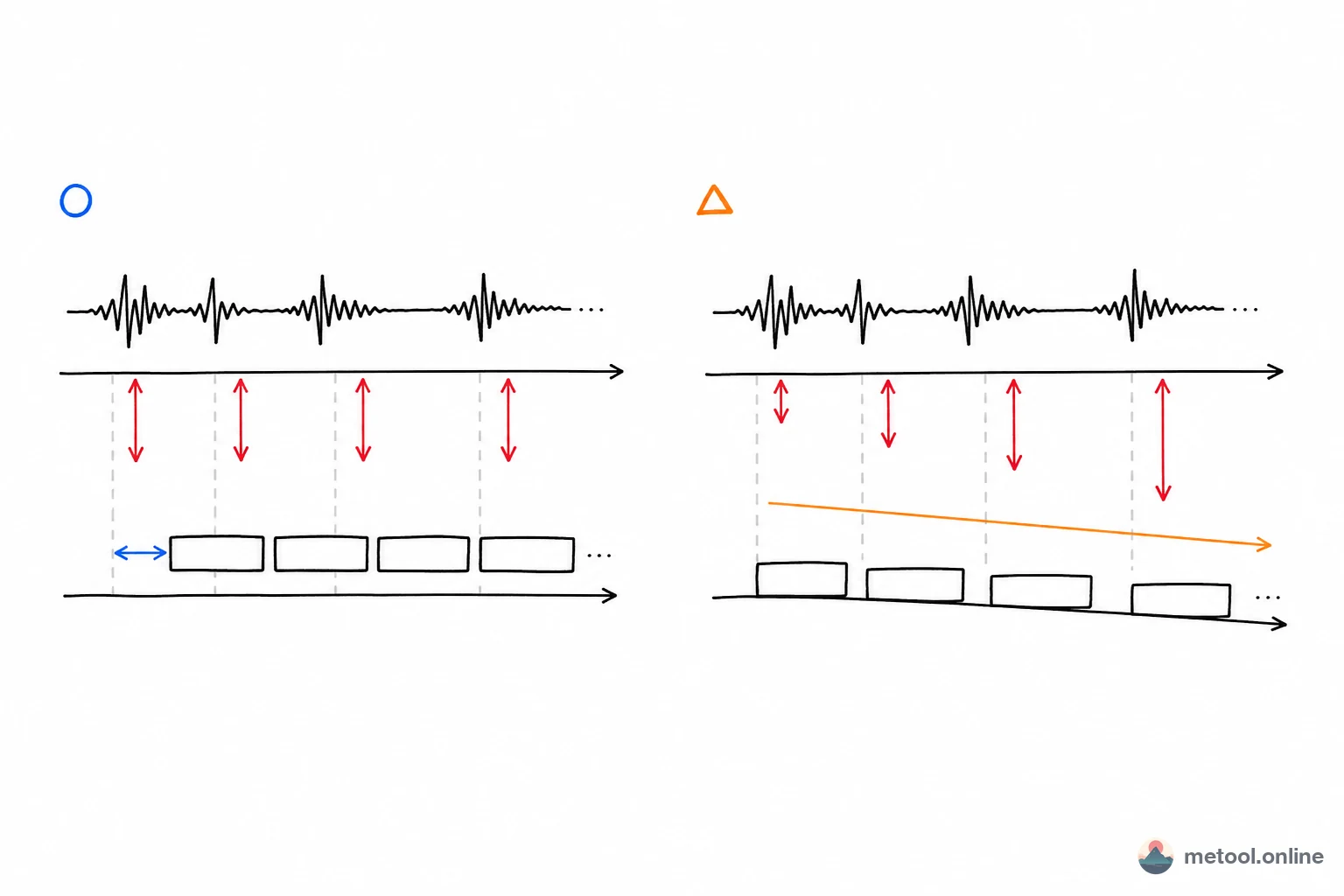
- Uniform delay or advance (most common, ~60% of cases) — every cue is 2.3 seconds late. Use "whole-file offset" with -2300 ms.
- Video has its intro removed — subs are early at the start, eventually drift in sync. Use whole-file offset with a negative value.
- Subtitles based on PAL 25 fps but your video is NTSC 23.976 fps (~25% of cases) — fine at the beginning, drifts further off as the movie goes on. Use "frame-rate convert" 25 → 23.976.
- OCR subtitles with irregular drift (~10% of cases) — extracted from hardsubs, head and tail drift by different amounts. Use "anchor first & last" — calibrate the first and last cue to their correct times; everything between is interpolated linearly.
Anything more complex (speech rhythm completely mismatched with the subtitles) needs a proper subtitle editor for line-by-line re-alignment, which is outside this tool's scope.
Why "Anchor First & Last" Is the Most Underrated Mode
Most subtitle sync tools only offer "whole-file shift," but a class of mismatch problems shift can't fix: opening lines are aligned, by 30 minutes the gap is 5 seconds, by 60 minutes it's 10 seconds.
This progressive drift usually comes from:
- Subs based on the PAL 25 fps version, video is NTSC 23.976 fps (~4.3% speed difference)
- Video has been speed-adjusted in an editor without re-syncing the subs
- OCR'd subs where head-to-tail error accumulates
What's needed here is linear stretching, not a shift: pull the first cue to position A, pull the last cue to position B, and let everything between scale proportionally. That's exactly what MeTool's "anchor first & last" does.
Practical tip: play the video, find the real timestamp of the first spoken line (e.g. 00:00:08,500) and the last (e.g. 01:32:15,200), and put those in the "should appear at" fields. The whole file calibrates in one pass — far more accurate and far faster than tweaking line by line.
Frame-Rate Conversion: The Underused Fix for "Wrong-Cut" Subtitles
The same film exists in different frame rates by region: PAL 25 fps in Europe, NTSC 23.976 fps in North America, theatrical DCP at 24 fps. When subtitle frame rate doesn't match video frame rate, you get linear drift — the longer the runtime, the worse the end-of-movie offset.
Classic example: subs from a fansub site labeled "BluRay 24 fps" played against your "WEB-DL 23.976 fps" rip. The 0.024/24 ≈ 0.1% per-frame difference sounds negligible, but for a 2-hour movie that's an 8-second cumulative error — subs end up 8 seconds ahead of the speech.
MeTool offers seven common frame-rate presets: 23.976, 24, 25, 29.97, 30, 50, 60. Identify your subs and your video's frame rates:
- Subtitle frame rate: from the file name (e.g.
The.Movie.2024.1080p.BluRay.x264-RARBG.srtimplies 23.976 or 24) or the source site's notes - Video frame rate: any media inspector — macOS Get Info, MediaInfo, VLC's "Codec Information"
For "subs 25 fps, video 23.976 fps", set source = 25 and target = 23.976. Every cue's time gets multiplied by 25/23.976 ≈ 1.0427, stretching the file to compensate for the too-fast subs.
Preserving Complex ASS Styling While Fixing Timing
ASS is beloved by fansub groups because it carries full styling: custom fonts, colored outlines, animations, karaoke highlights, positioning tags like \\pos, fade tags like \\fad. A tool that wipes that styling while "fixing the timing" effectively throws away hours of fansub work.
MeTool's subtitle sync handles ASS surgically: only the Start and End fields of each Dialogue line are recomputed; [Script Info], [V4+ Styles], [Fonts], [Graphics] all pass through verbatim. Style definitions, font tables, PrimaryColour, Outline color, KaraokeTimer, override tags — every byte is preserved.
Which means you can confidently:
- Apply a whole-file offset to a finished fansub ASS
- Frame-rate convert an ASS that contains OP/ED karaoke effects (e.g. BluRay subs onto a WEB rip)
- Anchor-align hardsub-OCR'd ASS that you've manually styled
Original styling stays 100% intact — only the timing changes. SRT/VTT/SBV/LRC don't carry styling, so this section is specific to ASS.