Same video, same subtitle file—some people see "uniformly half a beat late," others "fine at start, off by seconds at the end." They look like one problem but have different causes and fixes. Step one isn't editing—identify which kind of desync you have.
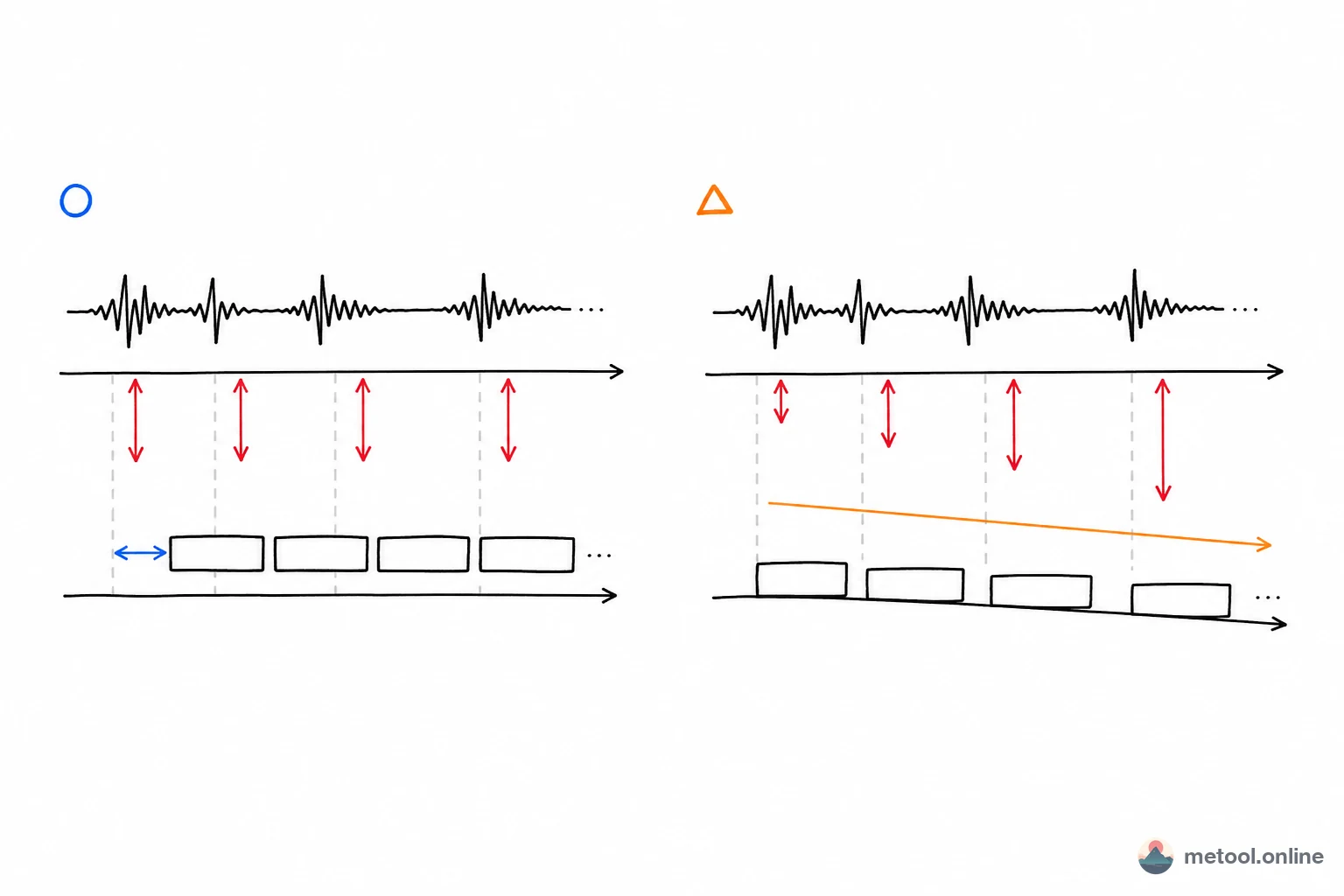
Subtitle Desync Comes in Three Types
Key conclusion first: fixed offset, linear drift, and frame-rate conversion—tell them apart by whether error is constant or growing.
| Type | Symptom | Cause | Fix |
|---|---|---|---|
| Fixed offset | Same seconds late/early throughout | Subtitle start misaligned with video | Shift all cues ±N ms |
| Linear drift | Accurate at start, worse toward end | Frame rate / time base mismatch | Linear stretch from two anchor points |
| Frame-rate conversion | Offset grows by fixed ratio (~4%) | 25 fps vs 23.976 fps, etc. | Scale times by frame-rate ratio |
Two-step diagnosis: check one cue at the start and one at the end. Same error start and end → fixed offset; end worse than start → linear drift / frame rate. Right diagnosis saves wasted effort.
Fixed Offset: Uniformly Late Is Easiest
If every cue is consistently the same number of seconds late (or early) vs. audio, that's fixed offset—most common and simplest. Usually the subtitle timeline and video start don't align—extra intro on the video, or subtitles from another release.
Fix: shift all times. Measure one line—e.g. subtitle 2.3 s late—and subtract 2300 ms from every cue. The subtitle sync tool takes an offset and shifts the whole file at once. Sign: subtitles late → subtract (shift earlier); early → add (shift later).
Linear Drift: Getting Worse Over Time
If the first few lines match but drift grows, that's linear drift—subtitle and video "run at different speeds," error accumulates. Uniform shift can't fix it; fixing one section breaks another.
Fix: two-point linear stretch. Pin the first cue and last cue to correct times; redistribute everything in between proportionally. The subtitle sync tool has a linear stretch mode—enter correct start and end times for first and last subtitles; middle cues adjust automatically.
Frame-Rate Conversion: Fixed Percentage Drift
Linear drift often comes from frame-rate mismatch—e.g. 25 fps (PAL) subtitles on 23.976 fps (NTSC/film) video. Duration scales by a fixed ratio; offset grows ~4% over time.
If you know both frame rates, scale all times by the ratio—more precise than manual end anchors. Suspect frame rate when drift is proportional: later = more offset, roughly constant percentage.
Need to Edit Text or Split Lines Too?
Sometimes you also fix typos, split long lines, or tweak individual cue times. Per-cue editing isn't what bulk sync tools do—you need a visual timeline.
The subtitle editor with live video preview lets you drag cues, edit text inline, split/merge lines—best for spot fixes. Bulk shift/stretch in the sync tool; fine edits in the editor.
Player Doesn't Accept This Subtitle Format?
Sometimes "out of sync" is really unsupported format—player only takes VTT, you have SRT, so subtitles don't show or behave oddly. That's format, not timing.
Use subtitle format conversion among SRT, VTT, ASS, SBV, LRC—timing and text preserved; then fix timing as above.
Summary
Don't rush to edit—identify the three types: constant error = fixed offset, uniform shift; growing error = linear drift, two-point stretch; proportional error = frame-rate scale. Bulk work: subtitle sync tool; per-cue: subtitle editor; wrong format: subtitle format conversion first. Right diagnosis fixes subtitles in seconds—all locally in the browser, no upload.