Smooth in Blender viewport, ten-second load and stutter on the web. The browser isn't "weak"—Web has different budgets than desktop: network download and lowest-common-denominator GPUs. Optimization cuts overhead that barely affects appearance across mesh, vertices, and textures.
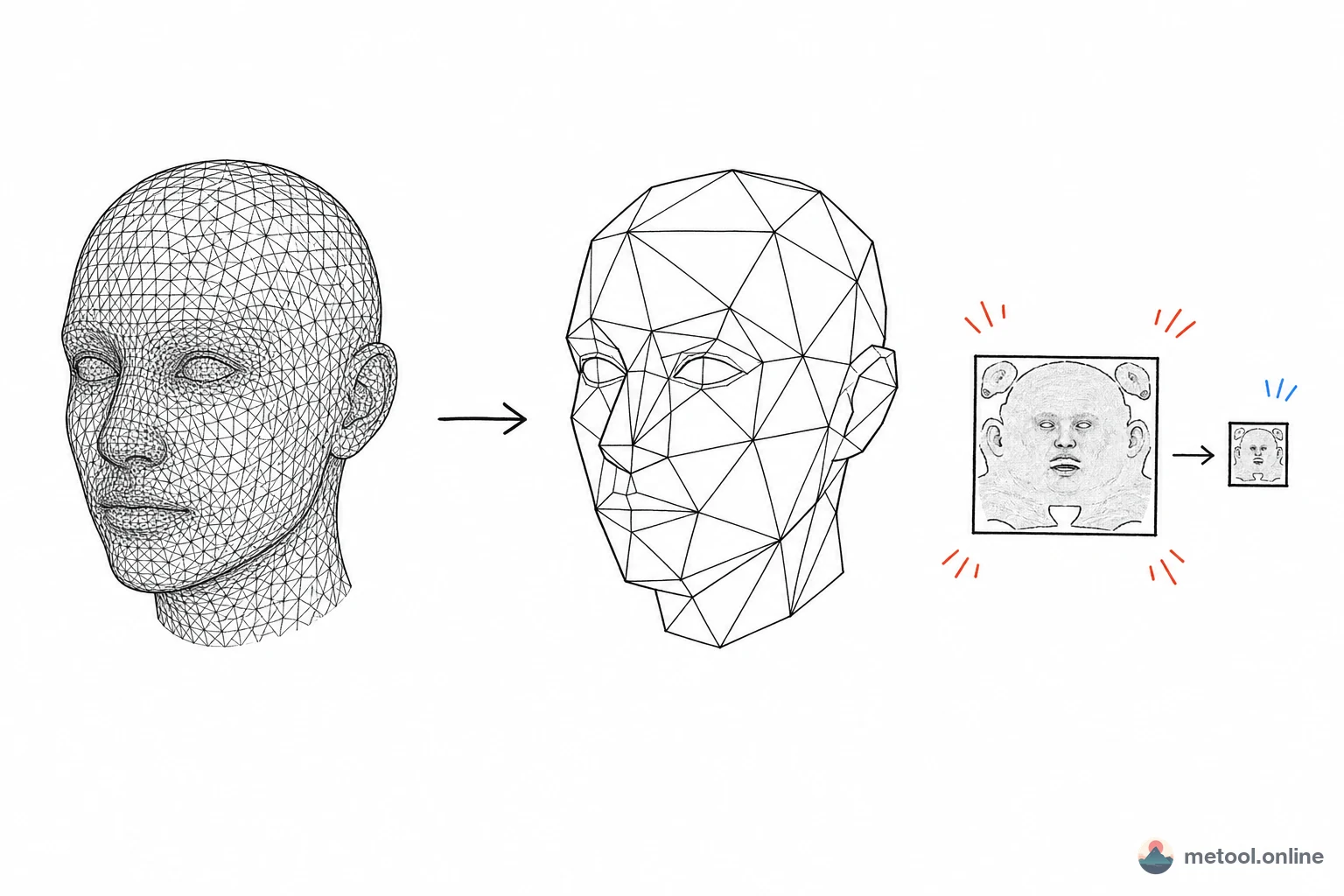
Why Is Web 3D More Constrained Than Desktop?
Web adds two hard constraints vs. desktop modeling: download bandwidth and device GPU floor. Desktop has local files and usually strong GPUs; the web must transfer the model over the network, then render in real time on possibly low-end phone GPUs.
Two bottleneck classes: loading—larger files, longer time to first frame; runtime—triangles, draw calls, texture sampling drive frame rate. Optimization targets both—three levers on the model: triangle count, vertex data, texture volume.
Reducing Triangles: What Decimation Does
Decimation (mesh simplification) approximates the original silhouette with fewer triangles. Mainstream approach: QEM (Quadric Error Metrics)—estimate surface deviation if each edge collapses, repeatedly collapse lowest-error edges until target count.
Why moderate decimation is invisible: flat regions lose tiny triangles with near-zero silhouette impact; high-curvature corners are preserved. Clear limits:
- Over-decimation collapses silhouette: beyond a ratio, surfaces turn blocky, detail vanishes—threshold depends on original geometry.
- UV seams and normals suffer: decimation can break UV boundaries → texture misalignment—algorithms must protect seams.
- Hard surface vs. organic: mechanical parts more sensitive; characters/terrain tolerate more.
Merging Duplicate Vertices: Optimization Without Fewer Faces
Many models store the same logical point multiple times—export splits vertices per face, so vertex count far exceeds geometric need. Welding/merge-by-distance shrinks data and improves cache hits without changing face count.
Often missed: merge only when attributes match. Same position but different normal or UV → don't merge blindly—hard edges and textures break. Merge is "same position + compatible attributes," not naive dedup. Same face count, very different render cost—vertex reuse and index cache efficiency differ.
Textures: Often the Biggest Volume
Many optimize face count and ignore textures often dominate file size. Uncompressed 4K ≈ 4096×4096×4 ≈ 64 MB per map—multiple maps exceed mesh data. Two different optimization paths—don't conflate:
| Technique | What it compresses | Nature | Notes |
|---|---|---|---|
| Lower resolution | Pixel count | One-time, irreversible | Match display size—distant maps don't need 4K |
| JPEG/PNG/WebP encode | Transfer size | Decodes to full VRAM | Smaller download, same runtime memory |
| GPU textures (KTX2/Basis) | VRAM | GPU samples directly | Saves download and VRAM; block-compression artifacts |
Key distinction: regular image compression only saves download—decoded VRAM is full size; GPU-compressed textures (Basis Universal / KTX2) let GPU sample compressed data—both download and VRAM, at block-compression quality cost.
Geometry Compression: What Draco Compresses
Mesh download size can shrink further with geometry compression—Draco quantizes vertex attributes (float coordinates to limited precision) + entropy coding, often reducing mesh to a fraction of original.
Tradeoffs: quantization is lossy—coordinate precision loss may cause subtle jitter on high-precision models; decode has runtime cost—client decoder adds overhead on very weak devices. Draco fits "network is bottleneck, device is OK"—not always-on.
How Much Optimization Is Enough?
No universal answer—depends on workload:
- Product viewer / configurator: prioritize load—decimate to sufficient silhouette, textures sized to display, geometry compression on.
- High-end viz (medical, industrial inspection): precision first—careful decimation/quantization; accept slower load.
- Mobile / weak network: tight VRAM and bandwidth—GPU textures and aggressive decimation pay most.
Fit depends on target device, acceptable precision loss, bottleneck is download or frame rate: download-bound → textures and geometry first; frame-rate-bound → face count and draw calls; precision-sensitive → dial back all lossy steps.
Summary
Web 3D lag adds download bandwidth and GPU floor vs. desktop. Three dimensions: decimation (QEM collapses low-error edges first—overdo and silhouette collapses), merge duplicate vertices (position + compatible attributes only), textures and geometry compression (distinguish download-only vs. VRAM savings—Draco/KTX2 each have lossy tradeoffs). All are appearance vs. cost tradeoffs—no one-click optimum, only appropriate strength for target device and precision requirements.