"How can a web page render
.texwithout installing TeX?" The answer is two completely different technologies for two different needs. Confusing them is the root of most misunderstandings.
First, Separate Two Kinds of Needs
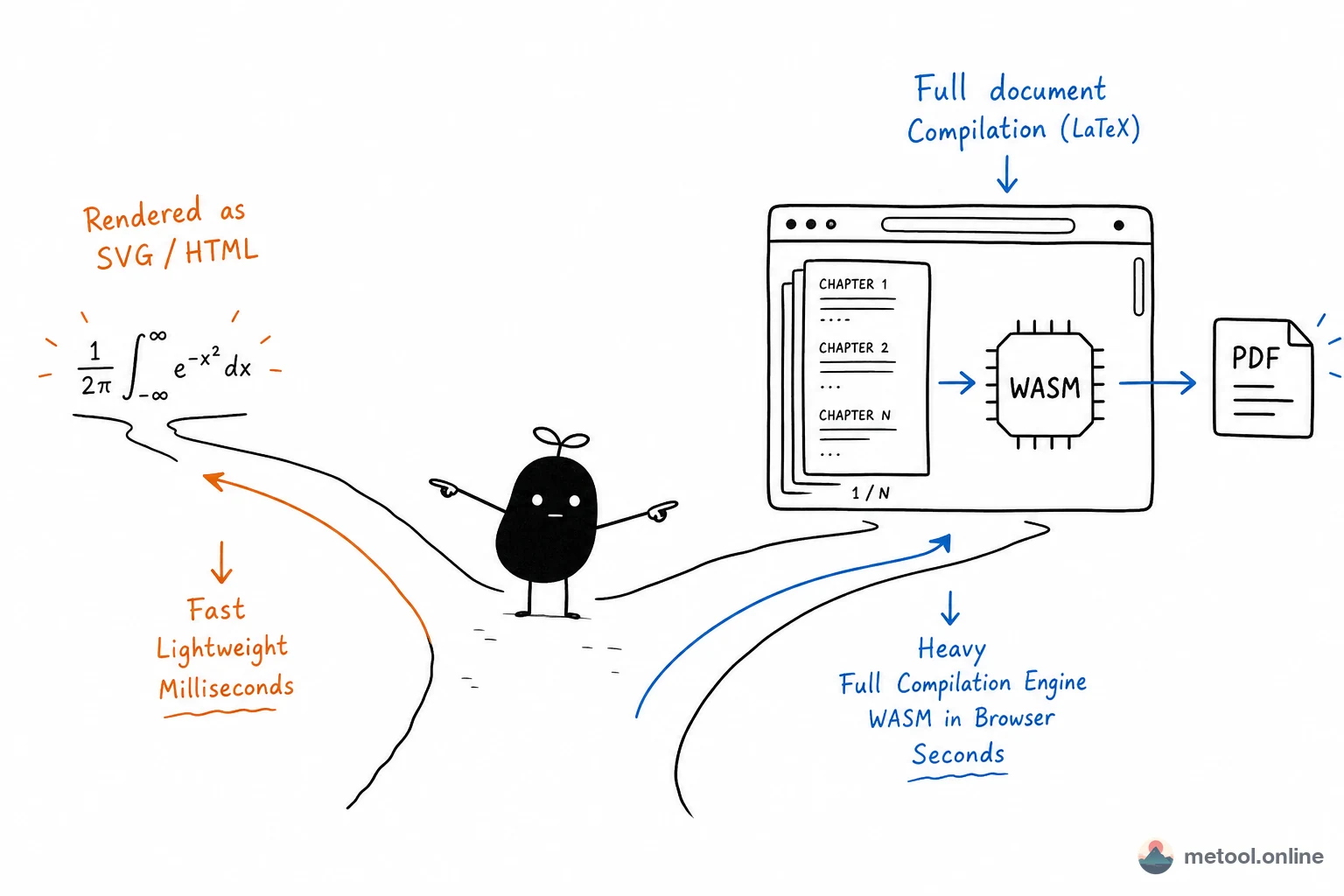
"Handling LaTeX in the browser" actually means two things with different stacks:
- Rendering math formulas only: inline formulas on web pages, formula editors;
- Compiling a full
.texdocument: with\documentclass, chapters, tables, pagination, bibliography, outputting PDF.
The first is lightweight syntax conversion; the second is full typesetting compilation. Below we look at each.
Part 1: Formula Rendering with KaTeX / MathJax
Turning \frac{a}{b}, integrals, and matrices into polished formulas relies on JavaScript libraries like KaTeX or MathJax. They parse LaTeX math syntax and convert it to HTML/SVG/MathML—they do not run a real TeX engine. The trade-offs are practical:
| Dimension | KaTeX | MathJax |
|---|---|---|
| Rendering | Synchronous, single DOM write | Asynchronous, may reflow multiple times |
| Size & speed | Lighter, faster | Heavier, slower |
| TeX command coverage | Common math subset | Broader coverage, more extensions |
| Typical use | Formula-heavy, real-time preview | Obscure commands or complex environments |
This approach is essentially string-to-markup conversion, usually done in milliseconds, with no pagination, cross-references, or bibliography engine involved.
Part 2: Full Document Compilation with WebAssembly TeX
Compiling a complete .tex into a paginated PDF is far beyond what formula libraries can do—you need a real TeX engine. The key technology is WebAssembly (WASM): TeX engines written in C are compiled to WASM bytecode and run in the browser JS engine at near-native speed. Representative implementations include SwiftLaTeX and texlive.js, which bundle the TeX kernel, required fonts, and common macro packages into frontend assets.
Typical data flow: .tex source → in-browser WASM TeX runtime → local typesetting and pagination → PDF output. Compilation runs on the user's device, not through a remote TeX service.
Client WASM vs Server TeX: Architectural Trade-offs
The same goal (get PDF in a web page) can follow two architectural paths:
| Dimension | Browser WASM TeX | Remote / self-hosted TeX service |
|---|---|---|
| First visit | Must download WASM + fonts (MB-scale, cacheable) | Client has almost no TeX-related downloads |
| Packages & fonts | Bundled common subset, size-limited | Can mount full TeX Live |
| Compute & scale | Bound by single-user CPU/RAM | Server horizontal scaling, but needs quotas and isolation |
| Source path | Stays in browser memory / local FS abstraction by default | Must upload .tex and dependency files to server |
| Offline | Can compile offline after resource cache | Depends on network and service availability |
| Operations | Static assets + CDN, no compile queue | Needs abuse prevention, sandbox, timeout, disk cleanup |
Neither is universally better: for lightweight documents with predictable package needs, WASM shifts compile cost to the client; for obscure packages, large projects, or deep integration with full BibTeX toolchains, traditional TeX distributions remain more reliable.
Capability Limits and Known Constraints
In-browser full compilation is not a 1:1 replacement for TeX Live. Common boundaries include:
- Limited package coverage: frontend bundles only carry a common subset;
\usepackagepointing to an unbundled package fails outright; - First-load size: WASM engine and fonts require a one-time download; latency is noticeable on slow networks or cold starts;
- Very large projects: hundreds of pages, multi-file
\input, complex bibliography requiring multiple passes—browser memory and long-task scheduling are less stable than local TeX; - Runtime constraints: main-thread blocking, tab memory limits, no full shell toolchain—extreme documents may stutter or OOM;
- Formula library limits: KaTeX/MathJax do not handle
\documentclass, floats, table-of-contents generation, and other document-level semantics; using them on a full.texyields formula fragments, not PDF.
Whether browser WASM fits a workload depends on whether required packages are in the bundle and whether document size and compile passes stay within what the browser can handle.
Summary
Handling LaTeX in the browser relies on two stacks: formula rendering (KaTeX/MathJax, syntax → markup) and full compilation (WASM TeX, complete typesetting engine). The former is light with narrow coverage; the latter is heavy, closer to real TeX, but constrained by bundling and runtime limits. Once you distinguish syntax conversion from typesetting compilation and compare client vs server architectures, you can pick the right path for document complexity and package needs.