You write cleanly in Obsidian or VS Code, paste into WeChat, and get either raw
#or headings and code blocks with no style. The cause is not bad taste—WeChat accepts inline-styled rich text, not Markdown. Keep.mdas source; convert once at publish time.
Why Doesn't WeChat Accept Markdown?
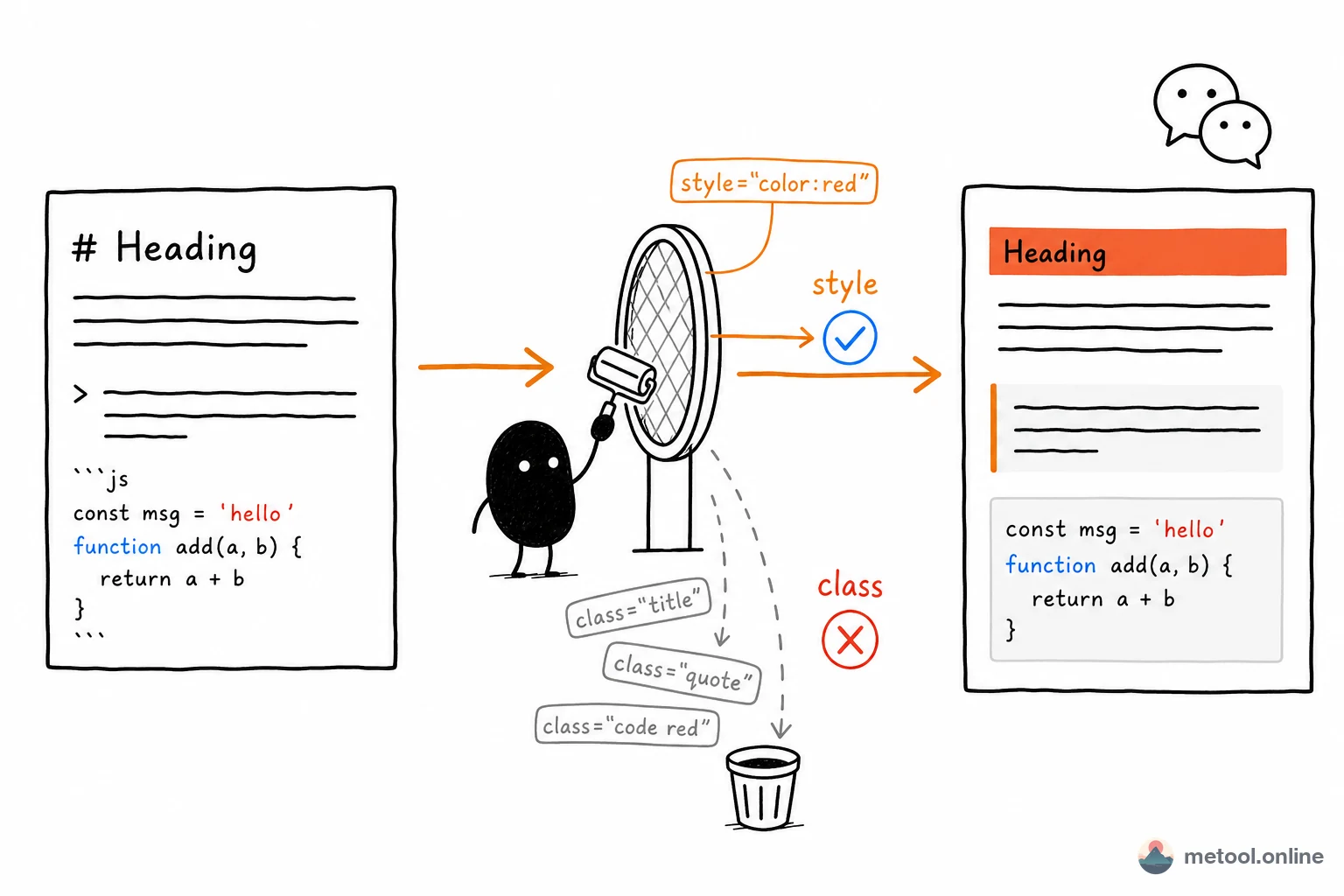
WeChat’s backend is a rich-text editor that only accepts HTML with inline style attributes. Markdown is plain-text markup that must be rendered first. Paste ## Heading and the editor treats it as ordinary text—# shows literally.
A quieter failure: you copy “already formatted” preview HTML and it still arrives plain. WeChat drops external CSS and class, keeping only style on the tag. Most previewers hang colors and sizes on classes; after the filter, only bare text remains. Broken layout is therefore two different mistakes: pasted source, or pasted class-based HTML.
Sending the same draft to Xiaohongshu and PDF is a multi-channel problem, covered in One Markdown draft, many channels. This article is only the WeChat paste.
What Is the Stable Approach: Keep Source, Convert Last?
Treat .md as the single source. Do not change how you write. Only before you hit publish, turn the content into inline-styled rich text WeChat will keep. You do not need a WeChat-native editor, and you do not restyle every heading in the backend from scratch.
In practice: paste or import the .md into Markdown to WeChat, preview with typical official-account styles, then copy into the backend. The point is not “it looks like WeChat.” The point is that surviving styles live in style attributes, so headings, code blocks, and quotes remain after the filter.
How Do Local Images in Markdown Get into WeChat?
The backend cannot see  on your disk. Before publish, every image must become something the backend understands—not a leftover local path.
Typical flow: the conversion step recognizes relative paths, matches files by name from the same folder or zip, and carries them with the rich text. Importing “markdown plus images” as a package beats uploading and rewriting links one by one. If the figures still live on a cloud URL, download them next to the draft first—do not rely on a preview that happens to load the remote file.
Why Can Code and Tables Go In, but Formulas and Diagrams Cannot?
Code blocks, tables, and quotes can become inline-styled rich text. WeChat will keep them. Mermaid source and LaTeX do not render there; you would paste characters. Custom SVG is also a poor fit.
| Content | Direct paste? | What to do |
|---|---|---|
| Code, tables, quotes | Yes | Convert to inline-styled rich text |
| LaTeX formulas | No | Export PNG, then insert |
| Mermaid diagrams | No | Export PNG, then insert |
Pulling one formula out of notes and exporting a figure is How do I send a formula from my notes without it turning into code?. Diagrams follow the same rule: render Mermaid where it works, export PNG, put the image back in .md, then convert for WeChat. Do not expect the backend to understand $...$ or a mermaid fence.
How Do I Save a Published WeChat Article Back to Markdown?
When the piece already lives on WeChat and you want an archive or a blog migration, the direction reverses: copy HTML from the page, then turn it into clean .md (unwrap figure, rejoin code split by <br>, strip leftover inline noise). That is a migration path, not the daily writing path. Day to day, .md stays the source; convert to WeChat only at publish.
When Is This Conversion Not Worth It?
Almost no formatting—plain prose, no code, no tables, no figures—is often faster typed in the backend. The workflow pays off for structured, code-heavy pieces you will reuse from the same source. The simpler the piece and the more it is a one-off, the less conversion helps.
Summary
WeChat drops styles because it strips classes and keeps inline style—that is not Markdown. Keep writing .md, convert to inline rich text at publish, match local images by filename, and export formulas and diagrams as PNG first. Other platforms belong in the multi-channel article, not in this paste-and-style problem.