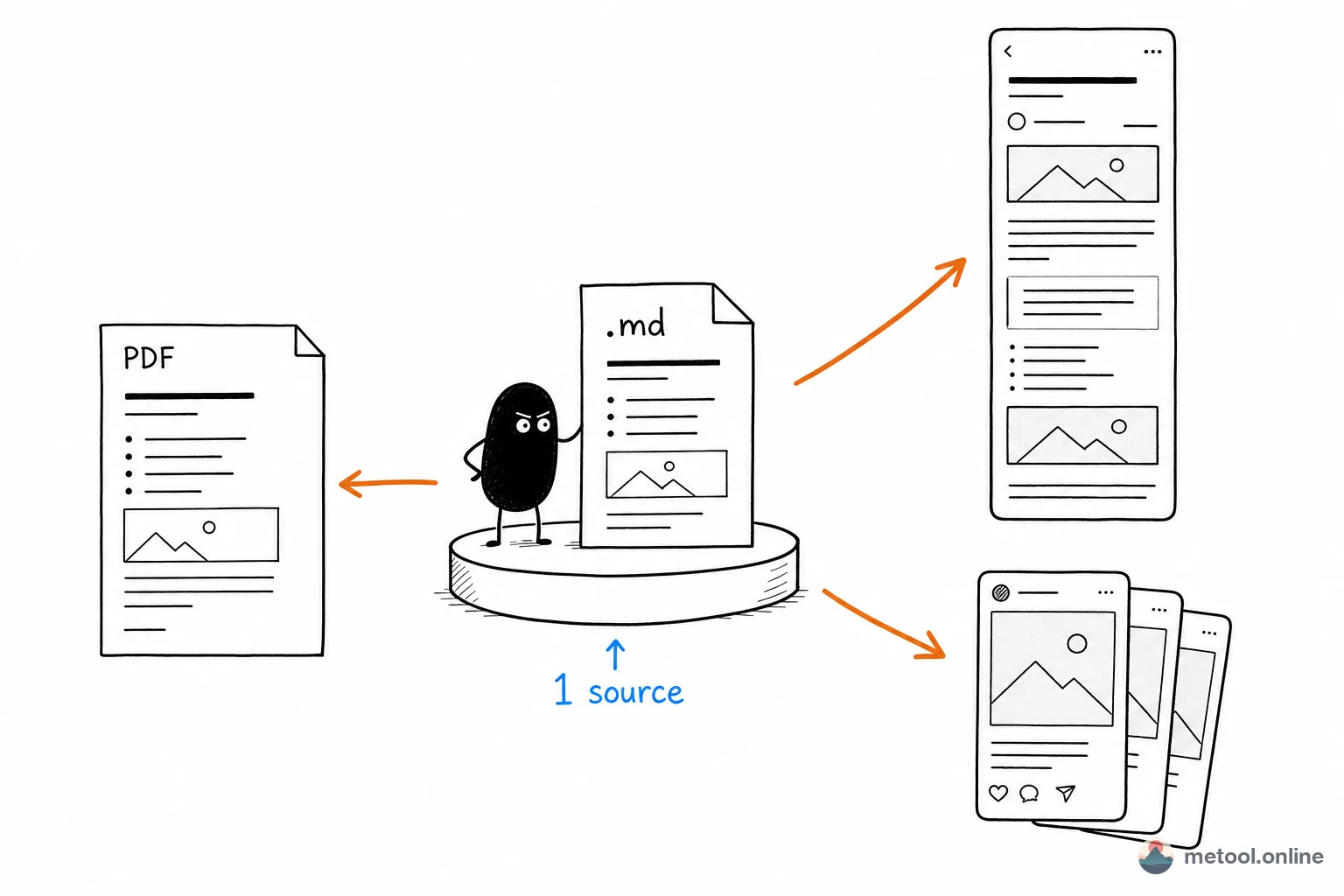
WeChat wants a long article, Xiaohongshu wants image cards, archives want PDF—reformatting per platform is the hidden time sink. The fix is not more hours. It is one
.mdas the single source, converted per channel, not rewritten for each backend.
Why Should Multi-Channel Publishing Start with Markdown?
Markdown describes structure (headings, lists, code, images) and does not carry one vendor’s stylesheet. Word carries Office styles; a WeChat draft carries inline CSS—they are native to one place. A .md file leaves appearance to downstream renderers.
That is the lever: content separated from presentation. You maintain one source; WeChat becomes rich text, Xiaohongshu becomes cards, archives become PDF—without rewriting the body. The four steps below only name the pitfall and which specialist article to open. They do not retell WeChat CSS or Word conversion.
In Step 1, What Structure Mistakes Blow Up Later Steps?
The next three steps all depend on honest heading levels and consistent lists. Skipping levels (# then ###) or messy indent splits cards wrong and mis-parses conversions. Keep “one idea per paragraph, level-2 headings as chapters” while you write—cheaper than fixing structure at publish time.
Any editor with a preview can be the workbench. Without a local install, Markdown online editor is one split-pane option. Syntax itself is Markdown syntax: ten patterns.
Is the WeChat Step the Same Topic as “Pasting Loses Styles”?
Not at the depth this URL should own. The backend does not parse Markdown and strips classes, so this step’s only job is: turn the same .md into inline rich text you can paste. Causes, local images, code, and formulas live in Writing WeChat articles in Markdown—why does pasting lose styles?. The pipeline stops at “convert at the last step.” It does not open another tool manual here.
When Splitting Xiaohongshu Cards, How Do You Choose Break Points?
Xiaohongshu is an image feed: long prose becomes several cards around 3:4 or 4:5. Splitting on level-2 headings (##) is usually enough; demote a section to ### if a card is cramped, or insert --- to cut finer. Technical notes and reading summaries fit “knowledge cards” better than lifestyle photos. Iterating pagination against a preview belongs in Xiaohongshu-specific pieces; this article does not take the “AI card split” query.
Should This Article Teach PDF and Word Conversion?
No. This step only confirms that the same source can become a formal file for people who only accept Word/PDF, or for your archive. Length, tables, and fonts belong in How do you deliver Markdown as Word or PDF?. Splitting 200+ pages by level-2 headings before merge is shared advice, not a second conversion tutorial.
How Do Charts and Formulas Reuse Without Drawing Them Three Times?
Neither WeChat nor Xiaohongshu renders Mermaid or LaTeX source. The shared fix is export a figure, put the PNG back in .md, then every later step carries the image. Pulling one formula out of notes so it does not become $...$ is How do I send a formula from my notes without it turning into code?.
How Does the Pipeline Map to Articles?
| Step | This step only | Details live in | Main pitfall |
|---|---|---|---|
| Write | Single source, clean structure | Syntax tutorial | Skipped headings, messy lists |
| Inline rich text | WeChat paste/styles article | Raw source or class-based preview | |
| Xiaohongshu | Long text → cards | Card-specific articles if needed | Breaks too coarse or too fine |
| Archive | Word / PDF export | Markdown to Word/PDF article | Huge docs, missing images |
| Cross-step | Formulas and diagrams | Formula-to-image article | Platforms do not render source |
Related tool cards at the end of the page map to each landing page. The body does not add “open this tool” at every step.
When Is Multi-Channel Not Worth It?
Strongly platform-native work—lifestyle photos meant only for Xiaohongshu, marketing long-images meant only for WeChat—should not be forced through one generic .md. The sweet spot is text- and structure-heavy knowledge: tutorials, notes, analysis, reading summaries. High information density that still holds on another platform is what reuse is for.
Summary
Multi-channel publishing saves reformatting by making one Markdown file the source—not by listing more tools. Clean structure → WeChat via the styles article → Xiaohongshu by headings → formal files via the Word/PDF article; figures and formulas become PNG first. Each specialist URL keeps its own query; this one keeps “many channels, one source.”