After headings, lists, and tables, Markdown still has advanced extensions that make docs feel professional: LaTeX math, Mermaid diagrams from text,
<details>for collapse, and sub/superscripts for chemistry and powers. These are renderer-dependent—check the target platform first. Each section below pairs source with a real render screenshot and a copy-paste practice sample.
What Counts as “Advanced,” and Who Needs It?
Advanced syntax means extensions beyond core Markdown—math, diagrams, sub/superscripts, collapsible blocks, footnotes, highlight, and similar. They were added by renderers later, so support is uneven: the same source can look polished on one site and raw on another.
Typical audiences: researchers and students need math; engineers and PMs need flowcharts and sequence diagrams; long-doc authors need collapse. For a short blog post or weekly update you may never need them—that is why this guide is separate. If headings, lists, and tables are still new, start with the basic Markdown syntax guide, then come back. Rule one: confirm your platform renders the feature, or readers only see symbols.
How Do You Write Math (LaTeX)?
Use LaTeX: inline math in $...$, display math (centered block) in $$...$$. The renderer must load KaTeX or MathJax; otherwise you see the raw dollars.
markdownThe mass–energy equation $E = mc^2$ is inline math.

Display math:

$$
x = \frac{-b \pm \sqrt{b^2 - 4ac}}{2a}
$$
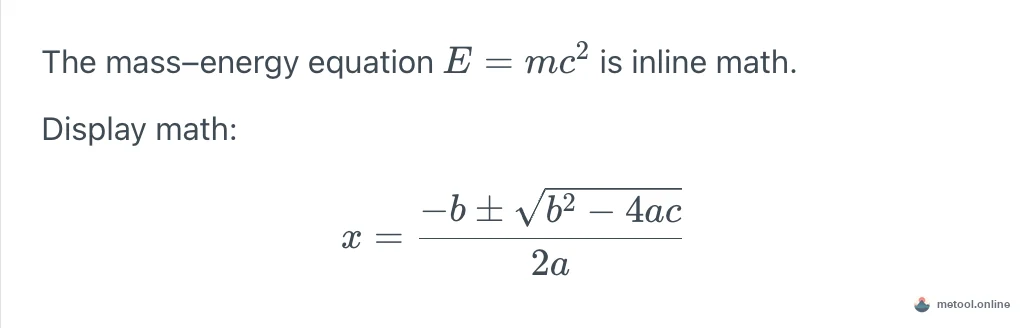
Common tokens: ^ superscript (x^2), _ subscript (a_1), \frac{}{} fraction, \sqrt{} root, \pm, \sum. Faster than Word’s equation editor for papers and STEM notes. If the renderer shows raw dollars or you need to send one equation in chat, do not paste the source—export that single formula as an image; see how to send a formula without it turning into code.
How Do You Draw Flowcharts and Sequence Diagrams (Mermaid)?
Mermaid turns a fenced mermaid block into diagrams—flowcharts, sequence diagrams, Gantt charts, and more. Nodes and arrows stay versionable text; change a line instead of redrawing.
markdown```mermaid
flowchart LR
  A([Start]) --> B{Decision}
  B -- Yes --> C[Do A]
  B -- No --> D[Do B]
  C --> E([End])
  D --> E
```
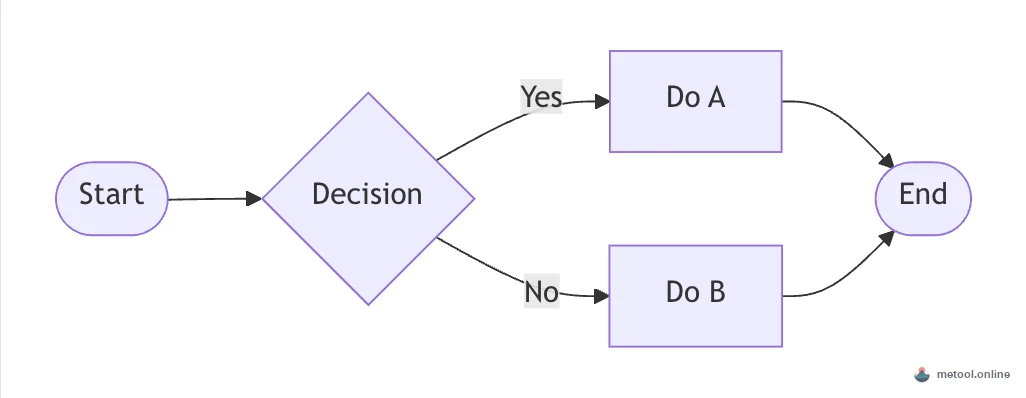
flowchart LR is left-to-right (TD is top-down); [] rectangle, {} diamond, ([]) stadium. Platforms like WeChat or Xiaohongshu often do not render Mermaid source—render in any Mermaid-capable preview, export PNG, then embed the image.
How Do Collapsible Sections Work (details)?
Use HTML <details> with a <summary> label; click to expand. Markdown allows raw HTML, so you can drop this in as-is. Add the open attribute to expand by default.
markdown<details open>
<summary>Click to expand the full error log</summary>

Collapsed content—long logs, code, or optional notes.

</details>

Use collapse for non-essential length: full logs, appendices, spoilers, optional steps. Leave a blank line after <summary> so inner Markdown still parses. GitHub and most editors support it; some rich-text platforms strip the tags.
Subscripts, Superscripts—and an Extension Pitfall
Superscript: ^text^ (e.g. m^2^). Subscript: ~text~ (e.g. H~2~O). Highlight is often ==text==, but not every renderer supports it—the screenshot below shows that gap.
markdownWater is H~2~O; area is measured in m^2^.

This line has ==text that should be highlighted==.

In the capture, H~2~O and m^2^ render correctly, but ==...== stays literal because highlight is off. Classic advanced-Markdown lesson: same source, different renderer. Fallbacks: LaTeX (H_2O, m^2) for sub/super; bold instead of highlight.
Can You Mix Raw HTML in Markdown?
Yes. Markdown allows raw HTML when markup cannot express a layout (color, centering, and so on). The <details> pattern above is the same mechanism.
markdownA normal paragraph.

<p style="color: #e11d48; text-align: center;">Centered red text via HTML.</p>
Two caveats: safe renderers strip dangerous tags (e.g. <script>), and HTML support varies—local editors and GitHub are usually fine; WeChat and some static hosts strip styles. Prefer HTML when you control the pipeline; test before cross-platform publish.
Escaping: How Do You Show * or # Literally?
Prefix with a backslash \. \* shows a star instead of italic; the same for \# and \`.
markdownI want a literal star: \*not italic\*, a hash \# , and a backtick \`.
Useful for “five stars *****”, “price $100”, or teaching Markdown itself. Look it up when you need it—you do not need to memorize every escape.
How Do Footnotes Work?
A footnote is [^id] in the body and [^id]: the note at the end—useful for citations without breaking the sentence. It is an extension: GitHub and many static blogs render it; WeChat-style editors usually drop it.
markdownA claim that needs a source.[^1]

[^1]: The note sits at the end; most renderers turn it into a jump link.
Use footnotes only after you confirm the target platform links them. Otherwise put a short parenthetical in the sentence.
Cheat Sheet and Compatibility
Typical defaults (plugins change the result):
| Feature | Syntax | GitHub | Typical notes app | WeChat official editor |
|---|---|---|---|---|
| Inline / display math | $...$ / $$...$$ |
Some flavors | Usually needs a math engine | No source render |
| Flowchart | ```mermaid |
Yes | If Mermaid is bundled | No source render |
| Collapse | <details> |
Yes | Often | Tags often stripped |
| Super/sub | ^x^ / ~x~ |
Unreliable | Depends on extension | No |
| Highlight | ==text== |
Usually no | Depends | No |
| Footnote | [^1] |
Yes | Depends | Usually dropped |
| Escape | \* |
Yes | Yes | N/A (not Markdown) |
When Not to Use These Features
Advanced syntax is the main source of cross-platform breakage. If you publish to WeChat, Xiaohongshu, or an unknown host, math, Mermaid, highlight, and footnotes may show as raw text or blanks. Safer path: rasterize formulas and diagrams to images, and use bold instead of highlight.
Rule of thumb: your own stack (local notes, GitHub, a known blog engine)—use freely; third-party platforms—test or degrade to images. To preview math and Mermaid side by side, paste the samples into the Markdown online editor, then decide whether the target platform needs images.
Wrap-Up
Core advanced toolkit: $...$ / $$...$$, ```mermaid, <details>, ^x^ / ~x~, footnotes, raw HTML, and \. They raise document quality but depend on the renderer—verify before you publish, or fall back to images.
Related questions belong on their own URLs:
- Everyday headings and lists: how to write Markdown
- A formula pasted into chat becomes dollar signs: send a formula without it turning into code
- Someone only accepts PDF or Word: Markdown to Word or PDF